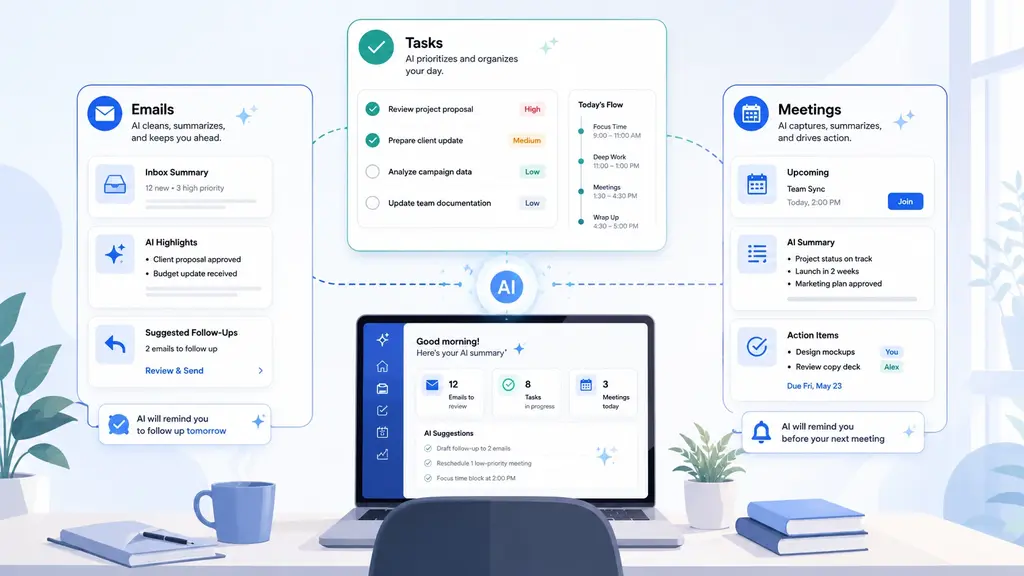
Learn how remote workers can use AI to manage emails, organize tasks, summarize meetings, draft updates, and reduce daily work overload.
AI productivity tools are everywhere, but many people still struggle to get consistent value from them. They try one tool for writing, another for planning, another for summaries, and another for task management, but the result often feels scattered. The problem is not always the tool. In many cases, the problem is the lack of a system.
An AI productivity system is a structured way to use AI across repeatable work processes. Instead of using AI for isolated tasks, a system helps you move from input to output in a clear sequence. It can help you collect information, organize it, turn it into useful work, and improve the process over time.
This guide explains how AI productivity systems work for freelancers, content creators, remote workers, and professionals who want to save time without losing control over their work. It also connects to practical TechArgers guides that show how these systems work in real use cases.
This guide is part of the broader teCHargers AI Tools hub.
An AI productivity system is a repeatable workflow that uses AI to support multiple stages of work. It is not just one tool, one prompt, or one automation. It is a structured process that helps you complete a category of work more efficiently.
For example, a freelancer may build an AI system for client work. That system could start with a client inquiry, turn the message into a project brief, generate clarification questions, help draft a proposal, create a project plan, summarize revisions, and prepare a final delivery email.
A content creator may build a system that starts with a rough idea, turns it into an outline, expands it into a script, creates social media posts, and stores the idea for future repurposing.
A remote worker may build a system that summarizes emails, extracts action items from meetings, creates a daily task list, and prepares end-of-day updates.
The key difference is structure. A single AI tool helps with a task. An AI productivity system helps manage a workflow.
Many users approach AI by collecting tools. They test new apps, install extensions, try prompts, and subscribe to platforms without creating a clear process. This can feel productive at first, but it often creates more complexity.
The problem is that tools do not automatically create productivity. A tool can generate text, summarize information, or organize tasks, but the user still needs to know when to use it, what input to provide, how to evaluate the output, and where the result should go next.
An AI productivity system solves this by giving each tool a role. Instead of asking, “Which tool should I use today?”, the user follows a workflow. The system defines what happens first, what happens next, and how the final output is created.
This matters because most work is not made of isolated tasks. Freelancers deal with client pipelines. Creators deal with content pipelines. Remote workers deal with communication and task pipelines. Professionals deal with research, planning, reporting, and execution.
AI becomes more useful when it supports the full process instead of just one step.
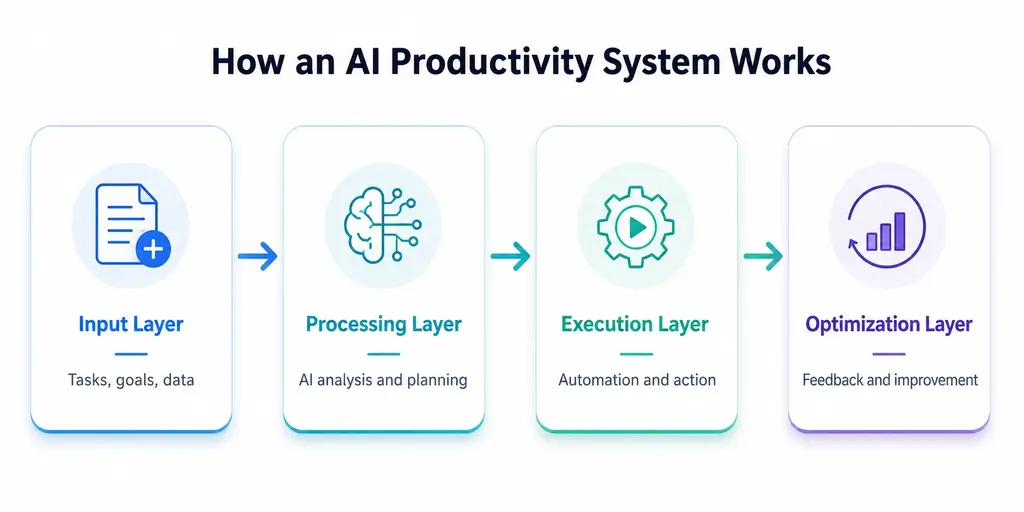
A practical AI productivity system usually has four layers: input, processing, execution, and optimization. These layers help turn scattered work into a repeatable structure.
The input layer is where information enters the system. This may include client emails, project briefs, meeting notes, research materials, voice notes, task lists, documents, customer feedback, video ideas, or internal messages.
Without a strong input layer, AI outputs are often weak because the tool does not have enough context. A good system starts by collecting the right information in a consistent way.
For freelancers, this may mean using a standard client intake form. For creators, it may mean storing content ideas in one place. For remote workers, it may mean collecting meeting notes and daily priorities before asking AI to organize them.
The input layer answers one question:
What information does the AI need before it can produce something useful?
The processing layer is where AI turns raw information into structure. This is where AI is often most useful because many people lose time organizing messy information before they can act on it.
AI can help turn a long client email into a project brief. It can turn meeting notes into action items. It can turn research notes into a summary. It can turn a rough idea into an outline. It can turn scattered tasks into a prioritized plan.
The processing layer does not usually create the final work. Instead, it prepares the work so the user can make better decisions and act faster.
This layer answers:
How should this information be organized so it becomes useful?
The execution layer is where the actual work gets done. AI may help draft, outline, summarize, rewrite, compare, plan, generate options, or prepare deliverables. However, the user still reviews the output and applies judgment.
For a freelancer, execution may include drafting a proposal, preparing a client update, or creating a project plan. For a creator, it may include writing a script, creating captions, or turning a long article into short posts. For a remote worker, it may include drafting emails, preparing meeting summaries, or organizing project updates.
The execution layer answers:
What output needs to be created from this workflow?
The optimization layer improves the system over time. This is where users save prompts, refine templates, track recurring tasks, improve checklists, and identify which steps can be automated further.
This layer is often what separates casual AI usage from a true productivity system. The first time you use AI to summarize a client brief, it may save a few minutes. But when you create a reusable client brief template and use it across every project, the time savings compound.
The optimization layer answers:
How can this workflow become easier, faster, and more consistent next time?
Freelancers can benefit from AI productivity systems because they manage both client delivery and business operations. A freelancer is often the salesperson, project manager, service provider, customer support person, and admin assistant at the same time.
This creates a lot of repetitive work. Client inquiries need responses. Proposals need to be written. For freelancers who want to improve this part of the client acquisition process, this guide explains how to use AI to write stronger freelance proposals and win more client work. Briefs need to be organized. Revisions need to be tracked. Projects need updates. Follow-ups need to be sent.
An AI productivity system can help freelancers manage this process without starting from zero every time.
A typical freelancer AI system may include:
The purpose is not to automate the relationship with the client. The purpose is to reduce the repeated admin and communication work that surrounds the paid service.
For a practical breakdown of the full workflow, read AI Workflow for Freelancers to Automate Client Work and Save Time.
Content creators often deal with idea overload. They may have many topics, drafts, notes, hooks, video ideas, and social media concepts, but no consistent workflow for turning those ideas into finished content.
AI can help creators build a content production system. Instead of creating each post, video, or article separately, creators can use AI to move ideas through a repeatable pipeline.
A creator workflow may look like this:
This type of system is useful because content creation requires consistency. A creator who relies only on inspiration may struggle to publish regularly. A creator with a structured AI workflow can turn one idea into multiple outputs more efficiently.
For example, a long YouTube video idea can become a script, title options, description, newsletter summary, short-form post ideas, and a blog article outline. AI can support each step, while the creator still controls the message, opinion, and final quality.
Future teCHargers guides will cover AI workflows for YouTube creators, content repurposing, and full content planning systems.
Remote workers often deal with scattered information. Emails, meetings, chat messages, documents, project tools, and task lists can make the workday feel fragmented. Even when the workload is manageable, the constant switching between sources can reduce focus.
AI productivity systems can help remote workers organize the day more clearly. AI can summarize long messages, extract meeting action items, organize priorities, create daily plans, draft updates, and prepare end-of-day summaries. For a practical workflow, this guide shows how remote workers can use AI to manage emails, tasks, and meetings without adding more complexity to the workday.
A remote work AI system may include:
The goal is not to let AI decide what matters. The goal is to reduce the time spent sorting through information so the worker can focus on execution.
For remote workers, the biggest productivity benefit often comes from reducing context switching. When AI helps turn scattered inputs into clear next actions, the workday becomes easier to manage. A deeper guide on how AI productivity systems for remote workers organize daily tasks can explain how to turn this into a practical daily workflow.
AI productivity systems are also useful for research-heavy work. Students, analysts, consultants, freelancers, and professionals often need to process large amounts of information before producing a useful result.
Research workflows can become messy because information comes from many places: articles, PDFs, notes, transcripts, reports, interviews, spreadsheets, and websites. AI can help organize that information into summaries, comparisons, outlines, and structured reports.
A research-focused AI system may include:
This type of system can save time, but it also requires careful human review. AI can help organize information, but users still need to verify important claims, check source quality, and apply expert judgment.
For knowledge work, AI is most useful as a structuring assistant. It helps users move from raw information to organized thinking faster.
AI tools are the execution layer of a productivity system. They help perform specific functions such as writing, summarizing, planning, organizing, searching, transcribing, or automating.
However, tools should not lead the strategy. The system should come first.
A common mistake is choosing tools before defining the workflow. This can lead to too many subscriptions and too much complexity. A better approach is to ask:
Once the workflow is clear, choosing tools becomes easier.
For example, a freelancer may need one AI writing assistant, one project management tool, and one document storage system. A creator may need an AI writing assistant, a transcription tool, and a content calendar. A remote worker may need an AI meeting summary tool and a task organizer.
The best AI productivity system is not the one with the most tools. It is the one where every tool has a clear purpose.
Many AI productivity systems can start with free or freemium tools. This is often the best approach for beginners because it allows users to test workflows before paying for advanced features.
Free tools can be enough for:
Paid tools may become useful when the workflow becomes more frequent, more complex, or more valuable. For example, a freelancer may upgrade when AI saves billable time every week. A creator may upgrade when the tool supports faster publishing. A remote worker may upgrade when integrations reduce repetitive manual steps.
A paid tool makes sense when it saves measurable time, improves output quality, supports revenue-generating work, or removes limits that slow down the workflow.
This is why users should not ask only, “Is this AI tool good?” A better question is:
Does this tool improve a workflow I already use?
The easiest way to build an AI productivity system is to start with one repeated workflow. Do not try to automate your entire work life at once. Choose one area where you lose time often.
Good starting points include:
Once you choose the workflow, write down the steps you currently follow manually. Then identify where AI can help.
For example, if you want to improve client intake, your current process may look like this:
AI can support several of these steps. It can summarize the email, identify missing information, create follow-up questions, and draft a proposal outline. You still decide whether the client is a good fit and what terms to offer.
This is the right balance. AI supports the workflow, but the user controls the decision.
You can use this basic structure for almost any AI workflow:
Input:What information starts the workflow?
Goal:What result do I want?
AI task:What should AI help organize, summarize, draft, compare, or plan?
Human review:What do I need to check, edit, approve, or decide?
Output:What final result should be created?
Reuse:Can this become a template for next time?
For example, a freelancer could use it like this:
Input:Client inquiry email.
Goal:Decide whether the project is a good fit and prepare a response.
AI task:Summarize the inquiry, identify missing details, and suggest follow-up questions.
Human review:Check whether the project matches my services, pricing, and availability.
Output:Professional reply to the client.
Reuse:Save the prompt as a client inquiry template.
This simple template helps turn casual AI use into a repeatable system.
The first mistake is trying to automate too much too quickly. AI productivity systems work better when they start small. One reliable workflow is more valuable than ten messy automations.
The second mistake is using vague prompts. If the input is unclear, the output will usually be generic. Good AI workflows include context, goal, format, tone, and constraints.
The third mistake is skipping human review. AI can make mistakes, misunderstand context, or produce content that sounds polished but is not accurate. Human review is essential, especially for client work, research, financial decisions, technical content, and public-facing material.
The fourth mistake is collecting too many tools. More tools can create more friction. Start with the workflow, then add tools only when they solve a clear problem.
The fifth mistake is ignoring privacy. Users should be careful when adding sensitive client information, confidential documents, personal data, or business records into AI tools. When possible, remove identifying details or use general summaries instead of full private data.
Start with these teCHargers guides:
AI Workflow for Freelancers to Automate Client Work and Save Time
More guides will be added as this cluster grows, including AI workflows for creators, remote workers, research tasks, project management, and productivity tools.
AI productivity is shifting from tool usage to system design. The people who get the most value from AI are not always the people using the most tools. They are the people who know how to build repeatable workflows.
A good AI productivity system helps collect information, organize it, turn it into useful work, and improve the process over time. This can help freelancers save time on client work, creators publish more consistently, remote workers reduce information overload, and professionals manage research more efficiently.
The best place to start is a repeated workflow. Build it, test it, improve it, and then expand. Over time, small AI-supported systems can become a practical productivity structure for daily work.
Learn how remote workers can use AI to manage emails, organize tasks, summarize meetings, draft updates, and reduce daily work overload.